
DSAR redaction software
Answering a subject access request means reading through every email that mentions the requester, and removing everyone else. Here is what to look for in a DSAR redaction tool, and how RedactBox handles each part.
- Outlook, Gmail, PST, MBOX, EML, MSG, PDF
- Uploads stored in the UK
- Free to try
What to look for in DSAR redaction software
Six things decide whether a tool helps you meet the one-month deadline without a missed redaction. For each, why it matters and what RedactBox does.
1
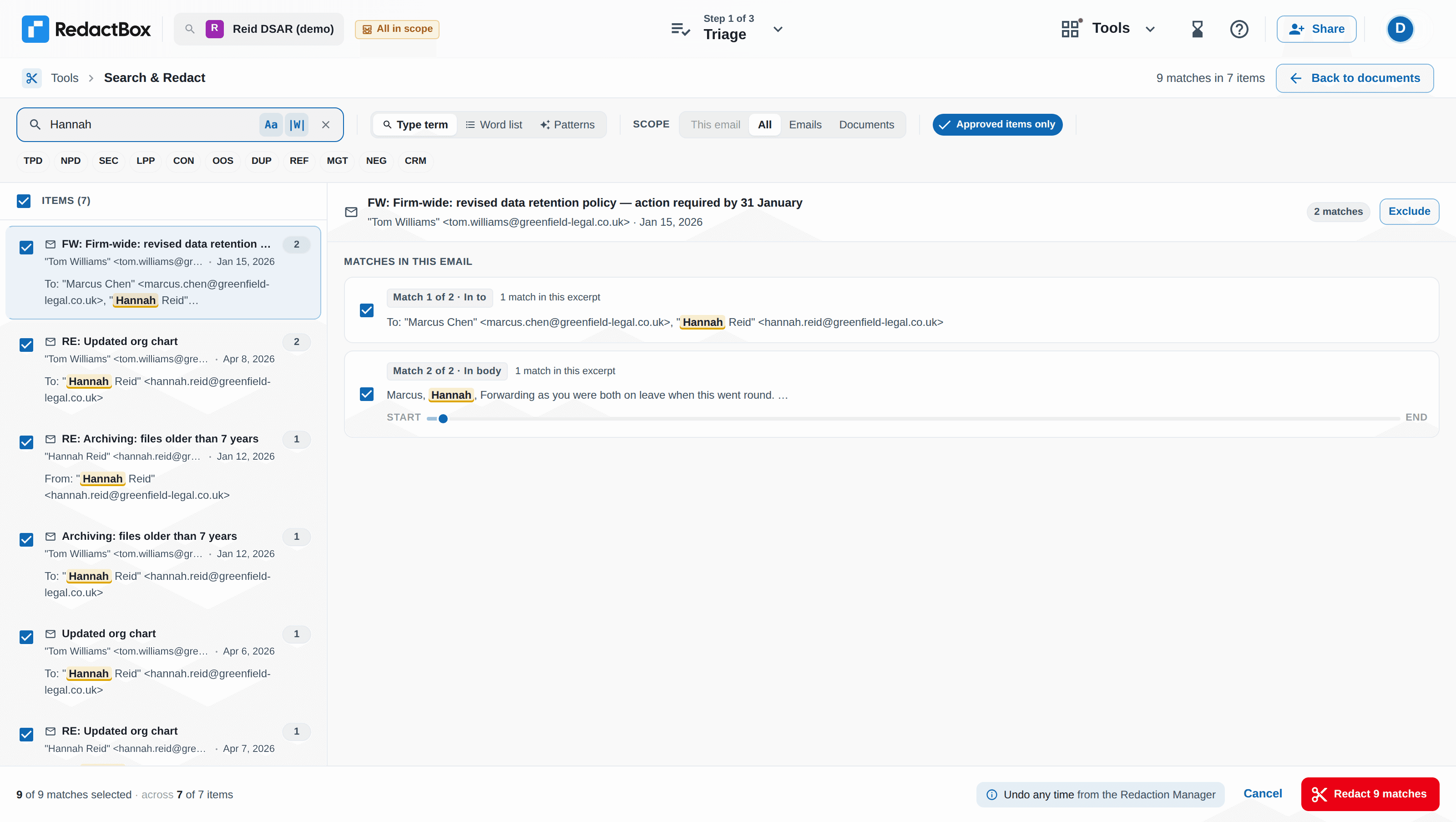
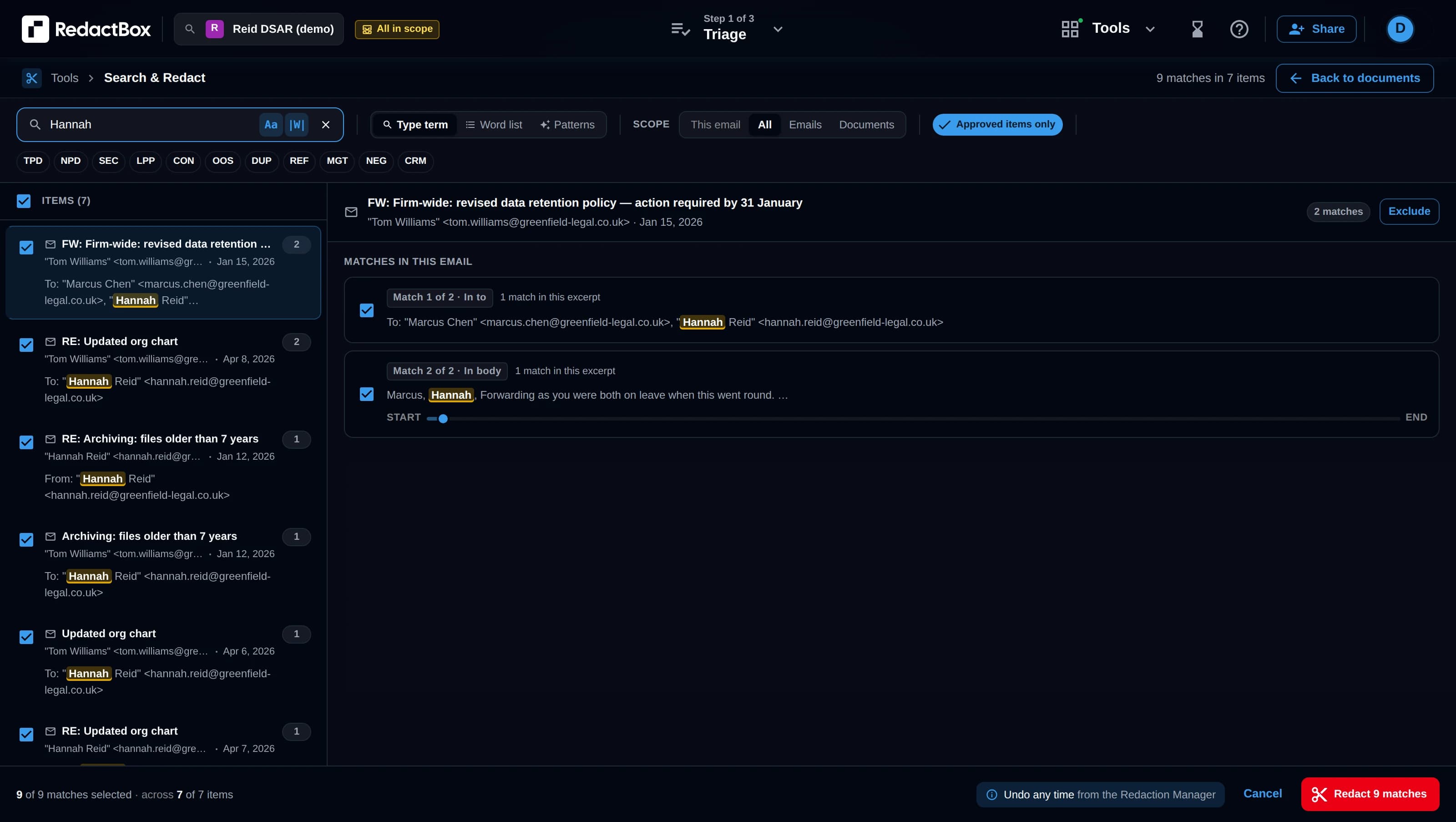
Bulk search-and-redact across the whole request
A DSAR is rarely a handful of documents. The same third-party name can appear in hundreds of emails, quoted replies and signatures. If every instance has to be found and covered by hand, the month goes on clicking, and the risk of missing one goes up with every item.
How RedactBox does it
Search once across every item in the project, review each match in context, and redact them all in one pass, with case-sensitive and whole-word options. Saved word lists carry the same names into the next request. Search & Redact, word lists.2
Redactions that are burned in, not drawn on
A black box drawn over text, or text highlighted black, can often be copied, moved or deleted to reveal what is underneath. GOV.UK guidance for schools is plain: make sure redactions cannot be undone.
How RedactBox does it
Exported PDFs have the redacted text removed, not covered. Each document is checked as it is exported, and if redacted text is still visible anywhere on the page, that document is held back and listed for you to fix.3
A redaction log you can defend
If the requester or the ICO questions the response, you need to show what you withheld and why. A record of decisions, kept as you go, is far easier than reconstructing one afterwards.
How RedactBox does it
Each project gives you a Schedule of Redactions (what was redacted and the reason, without the redacted text) to send with the response, plus a full CSV audit log with who redacted what, for your own records. Audit trail.4
Duplicate removal
Mailbox exports overlap. The same email turns up in the sender’s Sent folder and every recipient’s Inbox, and you should not have to review or redact it five times, or risk redacting it differently each time.
How RedactBox does it
RedactBox groups copies by their Message-ID across every uploaded file and lets you keep one, with the extras excluded from the export. Duplicate detection.5
The formats your mail system actually exports
Most DSAR data comes out of Microsoft 365 or Google Workspace as mailbox exports, not as tidy PDFs. Converting thousands of emails to PDF before you can start adds a step and a place for things to go wrong.
How RedactBox does it
Upload PST (Outlook, Microsoft Purview), MBOX (Gmail, Google Vault), EML, MSG and PDF files directly. Large uploads resume if the connection drops. Supported formats.6
Where the data is held
You are sending a requester’s personal data, and everyone else’s in their emails, to a processor. You need to know where it is stored and processed, and have a data processing agreement in place.
How RedactBox does it
Uploads are stored in the UK and processed in the EU. Email content is not transferred outside the UK or EU. The DPA and sub-processors are published.
Built for requests in the thousands
In RedactBox’s own data (October 2026), the typical SAR project contains around 600 emails, and one in ten contains more than 4,500. Reviewing that one email at a time is where the month goes.
Nine in ten redactions in RedactBox are applied in bulk: one search, reviewed in context, redacted across every matching item. People Detection lists everyone who sent or received a message, so you can decide once per person. People Detection.
Three ways to redact a DSAR
Each approach suits a different situation. Whichever you choose, the controller stays responsible for the response, and the redactions have to be permanent.
Redacting by hand in a PDF editor
Works well for
A small request of a few documents, where you already have a PDF editor with a proper redaction tool, such as Adobe Acrobat Pro. A true redaction tool removes the text rather than covering it.
Things to weigh up
Emails have to be converted to PDF first, and the work is document by document. Keeping decisions consistent across hundreds of emails, and keeping a log of them, is up to you. Drawing shapes or highlighting text black is not redaction.
Outsourcing to a redaction service
Works well for
A one-off, very large or contentious request where you do not have the staff time, or want experienced reviewers to make the calls.
Things to weigh up
You are still the controller and accountable for the response. Cost is usually per request or per volume, turnaround depends on the provider, and you need a data processing agreement before sending them the data.
Dedicated DSAR redaction software
Works well for
Organisations that answer SARs regularly, from mailbox exports, and want to do the review themselves with bulk tools and a log built in.
Things to weigh up
A subscription and a new tool to learn. Check where the data is held, which file formats it takes, and whether it handles your largest likely request. Try it on a real request before you commit.
What RedactBox does not do
There is no OCR, so scanned pages and images can be redacted by drawing over them but cannot be searched. Attachments are flagged and counted for you to handle separately; they are not redacted in place. If most of your requests are scanned paper records, a tool with OCR will suit you better.
DSAR redaction software questions
What is DSAR redaction software?
Can I redact emails for a DSAR in Outlook or Gmail?
How big is a typical DSAR?
Does RedactBox read text in scanned documents or images?
How much does RedactBox cost?
Is RedactBox only for schools?
Free: the SAR redaction checklist
The step-by-step checklist for redacting a Subject Access Request correctly: third-party data, audit trail and all. Straight to your inbox.
Try it on a real request
The free tier takes one document up to 500 MB, so you can upload a mailbox export and see how the review works before you pay anything.