
Triage thousands of emails before you redact
Filter and search across .mbox, .pst, .eml and .msg in one project, then Approve, Flag or Trash each item and redact only what matters.
A focused workflow for the first pass
A SAR or DSAR archive is rarely all relevant. Triage gives you every tool you need to whittle a huge mailbox down to the items that matter.
Triage mode
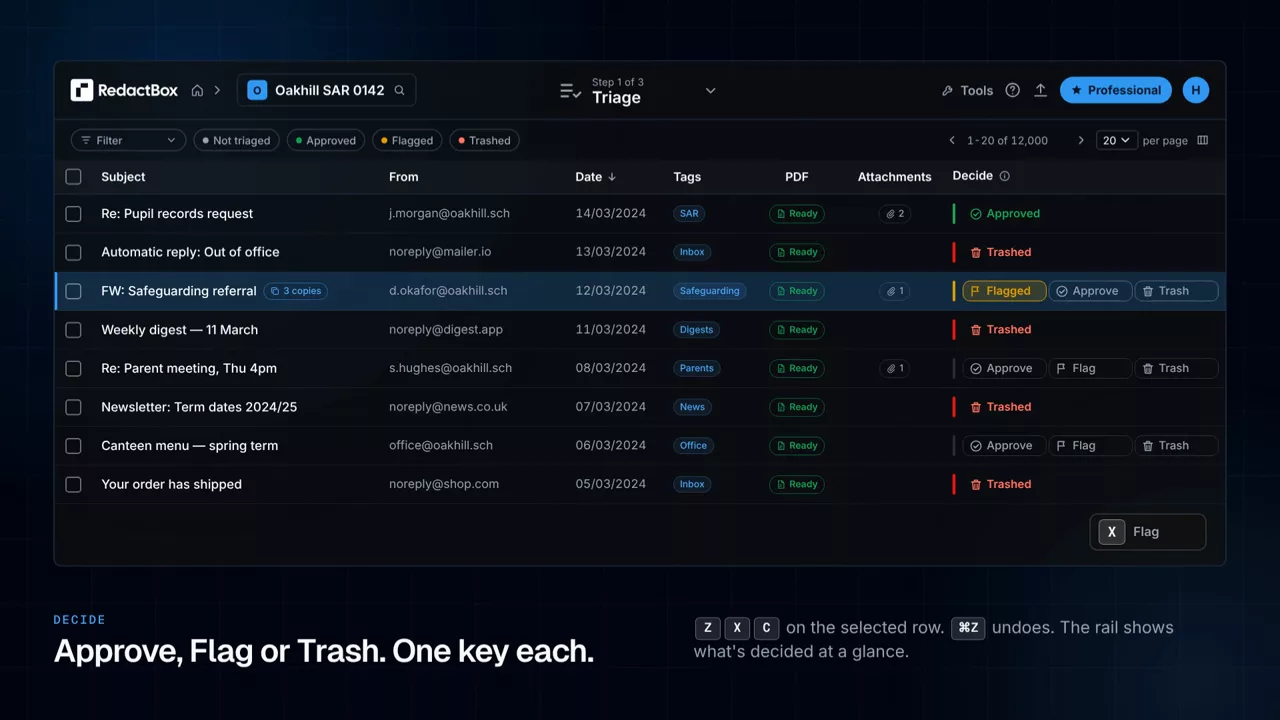
Switch to triage to review without committing. Approve, Flag or Trash each item: approved items go on to Redact, flagged ones wait for another look.
Filter anything
Filter by sender, recipient, subject, date range, attachments, body content or PST folder. Combine filters freely.
Bulk status updates
Apply a status to every email matching the current filter, and clear out 500 marketing emails in one click.
Cross-file search
Search across every file in a project at once. No need to switch between mailboxes.
Hand off to redact
Once triage is done, only approved items appear in Redact. The work that follows stays focused.
Preview before deciding
Open any email inline. See attachments, full headers, and threading without leaving the triage view.
Preview attached files
PDFs, pictures, Word, Excel, CSV and text files open read-only before anything is approved. Other types can be converted to preview without adding them to the export.
Keep or leave out each file
An attached file goes with its message by default. Leave it out, or keep it whatever happens to its message.
From and To, and your columns
From and To show by default. Show or hide columns, reorder them and reset per step, saved to your account.
Where triage saves you the most time
Subject Access Requests (SAR / DSAR)
Cut a 12,000-email archive down to the 800 you actually need to respond with. Triage out internal automation, marketing, and out-of-period emails first.
eDiscovery and litigation hold
Triage by date range, custodian or keyword to surface privileged or relevant material before legal review.
FOI responses
Filter by date and topic, mark exempt material, and pass clean results to the redaction stage. Faster turnaround on every request.
Internal investigations
Pull a custodian export, triage by sender, recipient or keyword, and lock down the in-scope set before sharing with counsel.
Questions
Stop redacting the wrong emails
Triage is included on every plan. Upload a file, approve what’s in scope, and only do the redaction work that matters.